On this page
- What the BECE aggregate is and why it matters
- The WAEC 9-point stanine scale and percentile distributions
- How the aggregate is put together: Core subjects and electives
- The raw score tie-breaking mechanism in CSSPS
- Comprehensive worked examples across candidate profiles
- What different aggregates open up in Ghana
- CSSPS school categorisation and selection rules
- The 30% public basic school equity policy
- Automatic placement vs the CSSPS self-placement portal
- Strategic school selection: Building a balanced six-school list
- TVET and STEM pathways under the Free Senior High School framework
- Post-placement documentation and reporting day requirements
- Common mistakes with BECE aggregate and school choices
- Where this calculator stops
- Sources and official portals
What the BECE aggregate is and why it matters
The Basic Education Certificate Examination (BECE) is the decisive national assessment written by every Junior High School (JHS) Form Three student in Ghana. Administered by the West African Examinations Council (WAEC) Ghana National Office under the supervision of the Ministry of Education and the Ghana Education Service (GES), the examination serves dual purposes: it certifies the completion of basic education and functions as the primary competitive sorting mechanism for entry into Senior High Schools (SHS), Senior High Technical Schools (SHTS), and Technical and Vocational Education and Training (TVET) institutions across the country.
Unlike ordinary school examinations where academic performance is reported as a percentage mark out of 100, the BECE results profile is condensed into a single numerical index known as the aggregate score. The aggregate is not a percentage. Instead, it is the arithmetic sum of numerical grades earned across six designated subjects: the four compulsory core subjects and the candidate’s two highest-scoring elective subjects. Because WAEC assigns its best possible grade a numerical value of 1 and its lowest failing grade a value of 9, the aggregate operates on an inverted scale where a lower number indicates superior academic accomplishment.
The aggregate is the foundational currency of the Computerised School Selection and Placement System (CSSPS). Whether an aspiring student secures admission to an elite Category A boarding institution, a regional Category B school, or a district Category C day facility depends directly on their composite aggregate score and their underlying raw marks. Understanding how this figure is computed, how WAEC determines individual subject grades, and how the placement algorithm interprets choices enables students, parents, and headteachers to make strategic, realistic decisions before and after the release of official results.
The WAEC 9-point stanine scale and percentile distributions
To evaluate hundreds of thousands of candidates sitting different subject papers each year, WAEC Ghana does not rely on arbitrary percentage pass marks. Instead, the council uses a standardized nine-point grading system based on the stanine (standard nine) statistical scale. In a stanine distribution, raw test scores are mapped onto a normal distribution bell curve with a mean of 5 and a standard deviation of 2. This mathematical approach ensures that grades reflect a candidate’s relative position among their national peer cohort rather than the difficulty of a specific examination paper.
Under the WAEC BECE stanine framework, every subject is evaluated on numerical grades ranging from 1 to 9. Each numerical grade corresponds to a specific percentile slice of the national candidatures:
| WAEC Grade | Classification | Stanine Band | Percentile Distribution | Description and Meaning |
|---|---|---|---|---|
| Grade 1 | Highest / Excellent | Top 4% | 96th to 100th percentile | Awarded to the top four percent of candidates nationwide in that subject. Represents mastery of core competencies and exceptional analytical execution. |
| Grade 2 | Very Good / Higher Credit | Next 7% | 89th to 95th percentile | Awarded to the next seven percent. Indicates thorough comprehension of syllabus objectives with minor errors in advanced questions. |
| Grade 3 | Good / Credit | Next 12% | 77th to 88th percentile | Awarded to candidates performing well above the national median. Demonstrates solid foundational understanding across all testing objectives. |
| Grade 4 | Credit | Next 17% | 60th to 76th percentile | Clear credit level. Satisfies standard prerequisites for demanding academic pathways in upper secondary education. |
| Grade 5 | Average / Credit | Middle 20% | 40th to 59th percentile | The national median band. Reflects acceptable basic competence aligned with standard curriculum benchmarks. |
| Grade 6 | Pass | Next 17% | 23rd to 39th percentile | Satisfactory basic pass mark. Permitted for entry into general secondary programmes, though uncompetitive for hyper-selective courses. |
| Grade 7 | Weak Pass | Next 12% | 11th to 22nd percentile | Below national expectation. Represents significant conceptual deficits; often disqualifies candidates from science-based upper secondary combinations. |
| Grade 8 | Very Weak Pass | Next 7% | 4th to 10th percentile | Marginal pass near the syllabus floor. Unlikely to support academic continuation in related secondary subjects without remediation. |
| Grade 9 | Lowest / Fail | Bottom 4% | 1st to 3rd percentile | Outright failure. Indicates inability to demonstrate minimum curriculum competencies in the assessed subject. |
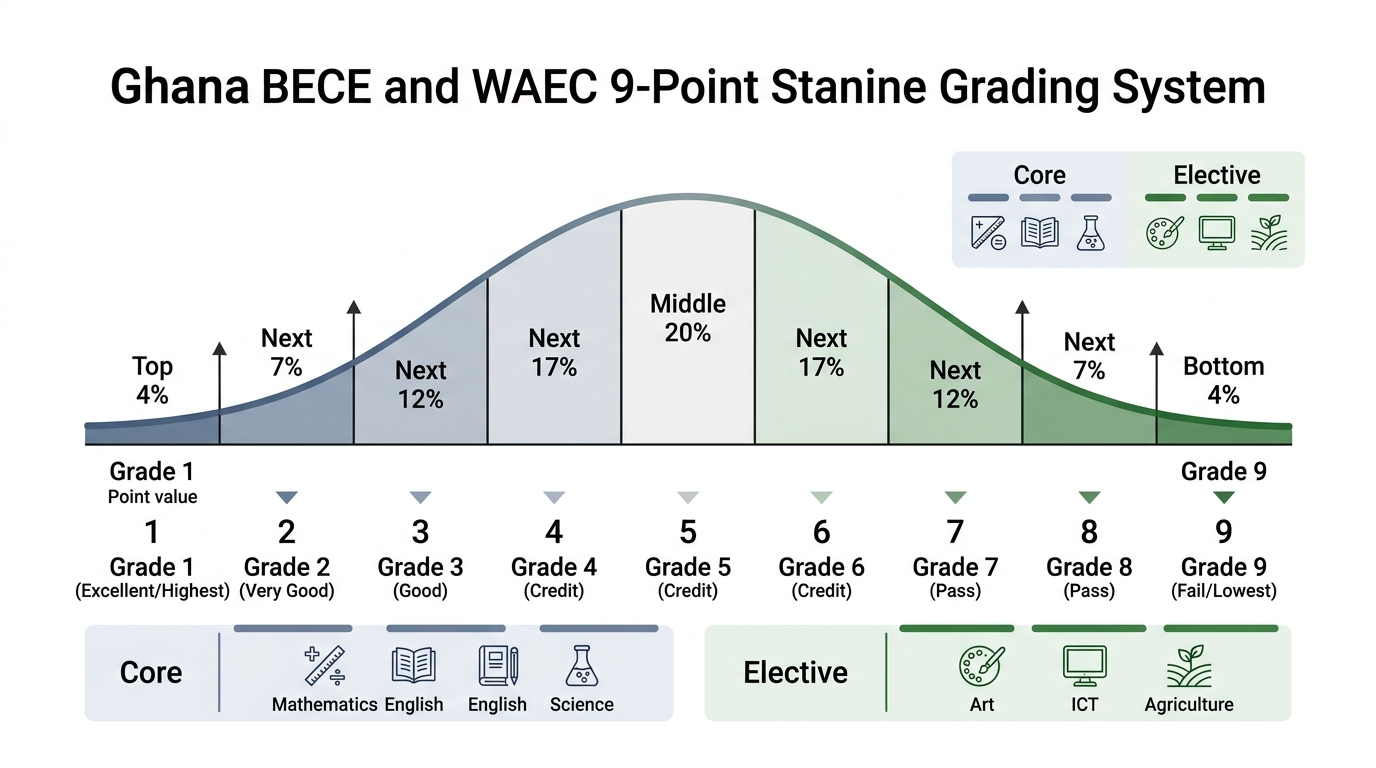
A critical feature of the stanine system is that grade boundaries move slightly each year during the national standardisation meeting. If a particular paper in Integrated Science or Core Mathematics proves unusually demanding, the raw score needed to enter the top four percent and earn Grade 1 will adjust downward accordingly. Conversely, if an examination paper produces high scores nationwide, the raw mark threshold for Grade 1 shifts upward. This ensures equitable comparative standards across consecutive academic years.
How the aggregate is put together: Core subjects and electives
The mathematical computation of the BECE aggregate follows a strict non-negotiable formula mandated by the Ghana Education Service. The composite aggregate score is derived by adding the numerical grades of exactly six subjects: four compulsory core subjects and the two best elective subjects.
The Golden Computation Rule: Aggregate = English Language Grade + Mathematics Grade + Integrated Science Grade + Social Studies Grade + Best Elective Grade + Second Best Elective Grade. No core subject can ever be dropped, substituted, or traded for an elective, even if an elective grade is markedly higher.
Candidates in Ghanaian Junior High Schools sit a standardized battery of curriculum subjects. These subjects are categorised into two operational groups:
The four compulsory core subjects
Every single candidate must count all four core subjects towards their aggregate:
- English Language: Assesses reading comprehension, summary writing, composition, grammar, and oral phonetics. English is universally required for instructional comprehension at Senior High School level.
- Mathematics: Evaluates arithmetic operations, algebraic expressions, geometric principles, statistics, and practical problem-solving.
- Integrated Science: Combines fundamental physics, chemistry, biology, agricultural science, and environmental sustainability concepts into a single comprehensive paper.
- Social Studies: Covers Ghanaian culture, governance, national history, environmental management, socio-economic development, and global citizenship.
The pool of elective subjects
Depending on the curricular resources, staffing, and facilities of the candidate’s Junior High School, candidates register for three or four elective subjects chosen from the following list:
- Ghanaian Language and Culture: Evaluates linguistic proficiency, literature, traditions, and grammar in an approved local language (such as Asante Twi, Akuapem Twi, Fante, Ga, Ewe, Dangme, Dagbani, Gonja, Kasem, or Nzema).
- Religious and Moral Education (RME): Covers religious traditions (Christianity, Islam, and African Traditional Religion), moral philosophy, ethics, family life, and character development.
- Information and Communications Technology (ICT) / Computing: Evaluates digital literacy, computer hardware architecture, network fundamentals, word processing, spreadsheet applications, algorithms, and internet safety.
- Basic Design and Technology (BDT) / Career Technology: Incorporates core pre-technical drawing, design principles, and specialized options such as Home Economics (Food & Nutrition, Clothing & Textiles), Pre-Technical Skills (Woodwork, Metalwork, Technical Drawing), or Visual Arts.
- French Language: Assesses French vocabulary, grammar, reading comprehension, written expression, and oral conversational ability.
- Arabic Language: Available in accredited Islamic basic schools and Islamic Education Unit facilities, testing Arabic linguistics, grammar, and literature.
When compiling the aggregate, the CSSPS algorithm inspects all elective subjects written by the candidate, arranges their numerical grades in ascending order (where 1 is best and 9 is worst), and selects the two smallest numbers. Any remaining third or fourth elective subjects are discarded from the aggregate calculation, although their grades remain recorded on the candidate’s official WAEC certificate.
The raw score tie-breaking mechanism in CSSPS
One of the most persistent misunderstandings among candidates and guardians is the belief that the aggregate score is the sole metric used to allocate secondary school placements. While the aggregate serves as the primary qualifying filter, it cannot resolve high-stakes competition on its own. In any given academic year, tens of thousands of candidates obtain identical aggregates. For example, several thousand applicants may all score an Aggregate 08 or Aggregate 09 while vying for a limited allocation of boarding beds in top-tier institutions such as Presbyterian Boys’ Secondary School (Presec Legon), Achimota School, Prempeh College, Opoku Ware School, or Wesley Girls’ High School.
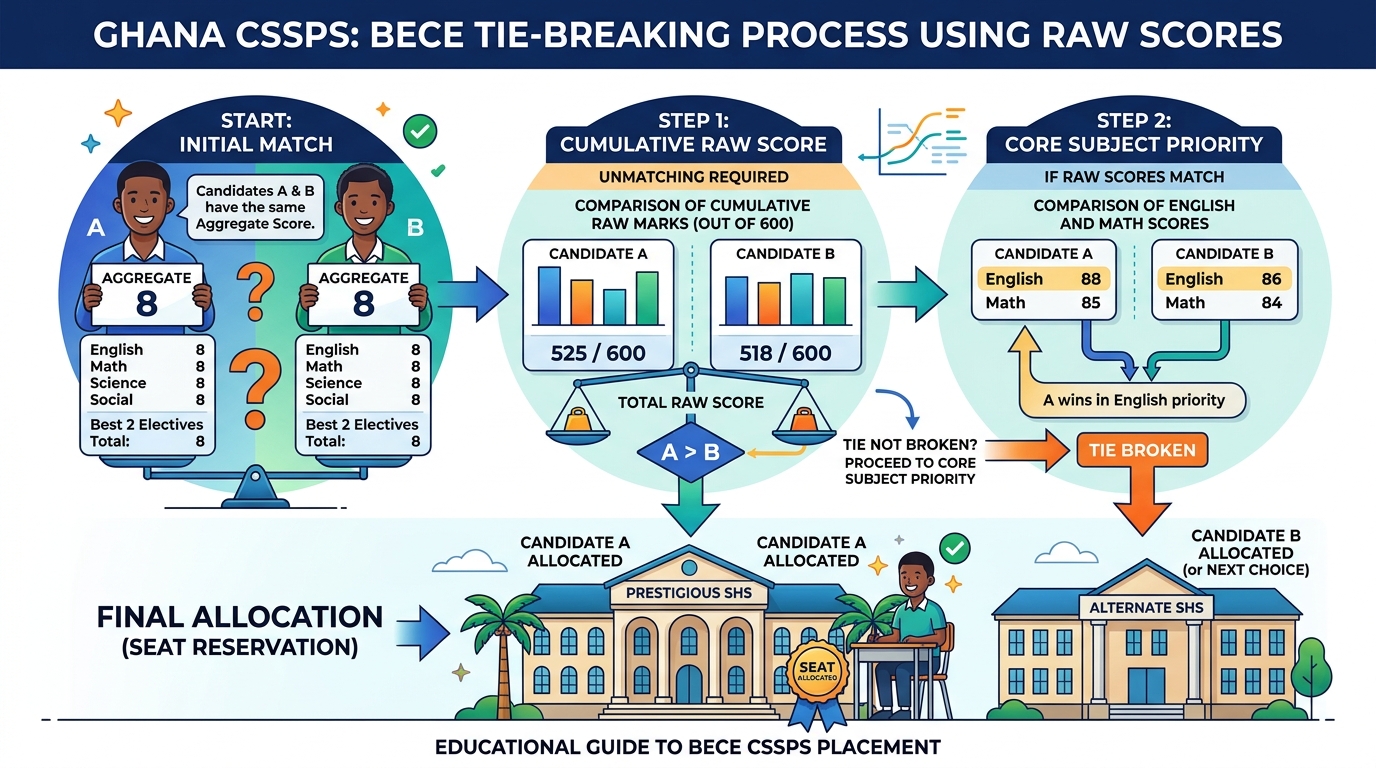
To allocate seats fairly when multiple candidates present the identical aggregate for a quota-limited programme, the CSSPS relies on the candidate’s cumulative raw score and a rigorous subject-priority hierarchy.
How the tie-breaker works in practice
- Cumulative Raw Mark out of 600: Every candidate’s raw marks (the actual percentage score earned in Section A objective papers and Section B written theory papers) for the six counted subjects are aggregated into a composite raw score out of 600. A candidate with Aggregate 08 who scored high raw marks (for example, 85%, 83%, 82%, 80%, 78%, and 76%, totaling 484/600) will systematically prevail over another candidate with Aggregate 08 whose raw marks scraped just over the lower boundary of each grade band (for example, totaling 442/600).
- Core Subject Raw Mark Hierarchy: If two candidates share the exact same aggregate and have nearly identical composite raw scores, the placement engine evaluates individual raw marks in core subjects in a predefined order of priority:
- First Priority — English Language Raw Score: Because language fluency dictates academic success across all secondary disciplines, English Language is the foremost tie-breaker.
- Second Priority — Mathematics Raw Score: For science, business, and technical programmes, mathematics proficiency determines quantitative readiness.
- Third Priority — Integrated Science Raw Score: Examined particularly for candidates selecting General Science and Agricultural Science curricula.
- Fourth Priority — Social Studies Raw Score: Examined for General Arts and Visual Arts applicants.
This mechanism explains why two candidates from the same Junior High School who both achieve Aggregate 07 may experience different outcomes when applying for General Science at an over-subscribed institution: the candidate with the superior raw percentage in English Language and Mathematics will secure the placement, while the candidate with lower raw marks is bumped down to their second or subsequent school choice.
Comprehensive worked examples across candidate profiles
To see how these principles operate in real scenarios, consider three distinct candidate profiles from different academic settings.
Profile A: The STEM and Science Specialist
Kwame attended a suburban basic school and aspires to study General Science at a Category A boarding institution in the Central Region. His WAEC BECE results slip reveals:
- English Language: Grade 2 (Raw mark: 79)
- Mathematics: Grade 1 (Raw mark: 88)
- Integrated Science: Grade 1 (Raw mark: 91)
- Social Studies: Grade 2 (Raw mark: 78)
- Computing / ICT (Elective 1): Grade 1 (Raw mark: 86)
- Career Technology / Pre-Technical (Elective 2): Grade 2 (Raw mark: 76)
- French (Elective 3): Grade 4 (Raw mark: 64)
- Religious and Moral Education (Elective 4): Grade 3 (Raw mark: 72)
Step 1: Calculate the core total. The four cores are English (2), Mathematics (1), Integrated Science (1), and Social Studies (2). Core subtotal = 2 + 1 + 1 + 2 = 6 points.
Step 2: Identify and sort the electives. The four electives sorted by grade are: Computing (1), Career Technology (2), RME (3), and French (4). The two best electives are Computing (Grade 1) and Career Technology (Grade 2). Elective subtotal = 1 + 2 = 3 points. The remaining electives (RME and French) are excluded.
Step 3: Compute composite aggregate. Total Aggregate = 6 + 3 = Aggregate 09. Kwame’s cumulative raw score across his six counted subjects is 79 + 88 + 91 + 78 + 86 + 76 = 498 out of 600. With Grade 1 in both Science and Mathematics and a competitive raw score near 500, Kwame is exceptionally well positioned for a Category A General Science placement.
Profile B: The General Arts Candidate with Core Asymmetry
Abena is a talented literature and language student who experienced difficulties with quantitative papers. Her results display:
- English Language: Grade 1 (Raw mark: 89)
- Mathematics: Grade 5 (Raw mark: 52)
- Integrated Science: Grade 3 (Raw mark: 72)
- Social Studies: Grade 1 (Raw mark: 84)
- Ghanaian Language - Asante Twi (Elective 1): Grade 1 (Raw mark: 92)
- Religious and Moral Education (Elective 2): Grade 1 (Raw mark: 87)
- French (Elective 3): Grade 2 (Raw mark: 80)
- Basic Design and Technology (Elective 4): Grade 3 (Raw mark: 70)
Step 1: Calculate the core total. English (1), Mathematics (5), Integrated Science (3), Social Studies (1). Core subtotal = 1 + 5 + 3 + 1 = 10 points. Notice that although Abena scored Grade 1 and Grade 2 across her electives, she cannot substitute her Grade 5 in Mathematics with any elective grade.
Step 2: Identify and sort the electives. The electives sorted are: Asante Twi (1), RME (1), French (2), BDT (3). The two best are Asante Twi (1) and RME (1). Elective subtotal = 1 + 1 = 2 points.
Step 3: Compute composite aggregate. Total Aggregate = 10 + 2 = Aggregate 12. Abena has a competitive aggregate of 12 and an outstanding raw score in languages and humanities. While her Grade 5 in Mathematics rules out selective General Science programmes, she is a prime candidate for General Arts, Visual Arts, or Home Economics in prestigious Category A or Category B schools.
Profile C: The Practical and Technical Aspirant
Kofi attended a rural public basic school and intends to pursue Mechanical Engineering Technology or Building Construction under the modernized TVET curriculum. His grades are:
- English Language: Grade 4 (Raw mark: 62)
- Mathematics: Grade 3 (Raw mark: 71)
- Integrated Science: Grade 3 (Raw mark: 70)
- Social Studies: Grade 4 (Raw mark: 63)
- Career Technology / Pre-Technical (Elective 1): Grade 2 (Raw mark: 77)
- Computing / ICT (Elective 2): Grade 2 (Raw mark: 75)
- Religious and Moral Education (Elective 3): Grade 4 (Raw mark: 61)
Step 1: Core subtotal. English (4) + Mathematics (3) + Integrated Science (3) + Social Studies (4) = 14 points.
Step 2: Elective subtotal. The best two electives are Career Technology (2) and Computing (2) = 4 points.
Step 3: Composite aggregate. Total Aggregate = 14 + 4 = Aggregate 18. Under the Free TVET initiative, Kofi’s strong credit profile in Mathematics, Science, and Technical skills makes him a standout applicant for leading Technical Institutes across the country.
What different aggregates open up in Ghana
Placement cut-offs in Ghana are dynamic, fluctuating each year based on candidatures, examination difficulty, and the volume of applications per campus. Nonetheless, historical CSSPS data provides dependable operational bands that indicate which school tiers are attainable for a given aggregate:
| Aggregate Band | Placement Profile | Accessible School Categories | Typical Course Options |
|---|---|---|---|
| Aggregate 06 to 09 | Elite National Tier | Category A national boarding schools (Presec, Achimota, Wesley Girls, Prempeh, Mfantsipim, Holy Child, Opoku Ware). | Unrestricted access: General Science, General Arts, Business, Visual Arts, Engineering Technology. High probability of securing first choice. |
| Aggregate 10 to 14 | High-Performance Tier | Category A (for non-science or through the public school equity quota) and premier Category B boarding institutions. | General Science (with high raw scores), General Arts, Business, Home Economics, Agricultural Science, Technical options. |
| Aggregate 15 to 19 | Solid Regional Tier | Category B boarding schools across all regions and premier Category C institutions. | Strong access to General Arts, Business, Home Economics, Agricultural Science, and TVET certificate pathways. |
| Aggregate 20 to 25 | District & Day Tier | Category C boarding and day schools, district community day Senior High Schools, and TVET institutes. | Comprehensive access to General Arts, Home Economics, Visual Arts, and vocational trades. Boarding depends on regional vacancy quotas. |
| Aggregate 26 to 30 | Catchment & Vocational Tier | Category C day schools, Category D compulsory community day schools, and TVET technical institutes. | Agricultural Science, Technical skills, Vocational arts, and general secondary options primarily on a day-student basis. |
| Aggregate 31 to 36 | Foundation Tier | Category D local day schools, community secondary technical schools, and technical training centres. | Applied vocational trades, apprenticeship-aligned TVET curricula, and local day school programmes. |
| Aggregate 37 and above | Specialized Placement Tier | National Vocational Training Institutes (NVTI), localized technical institutes, or private remedial re-sit pathways. | Practical trade certifications and technical skill specialisations. Candidates may also choose to re-sit through the BECE for Private Candidates. |
CSSPS school categorisation and selection rules
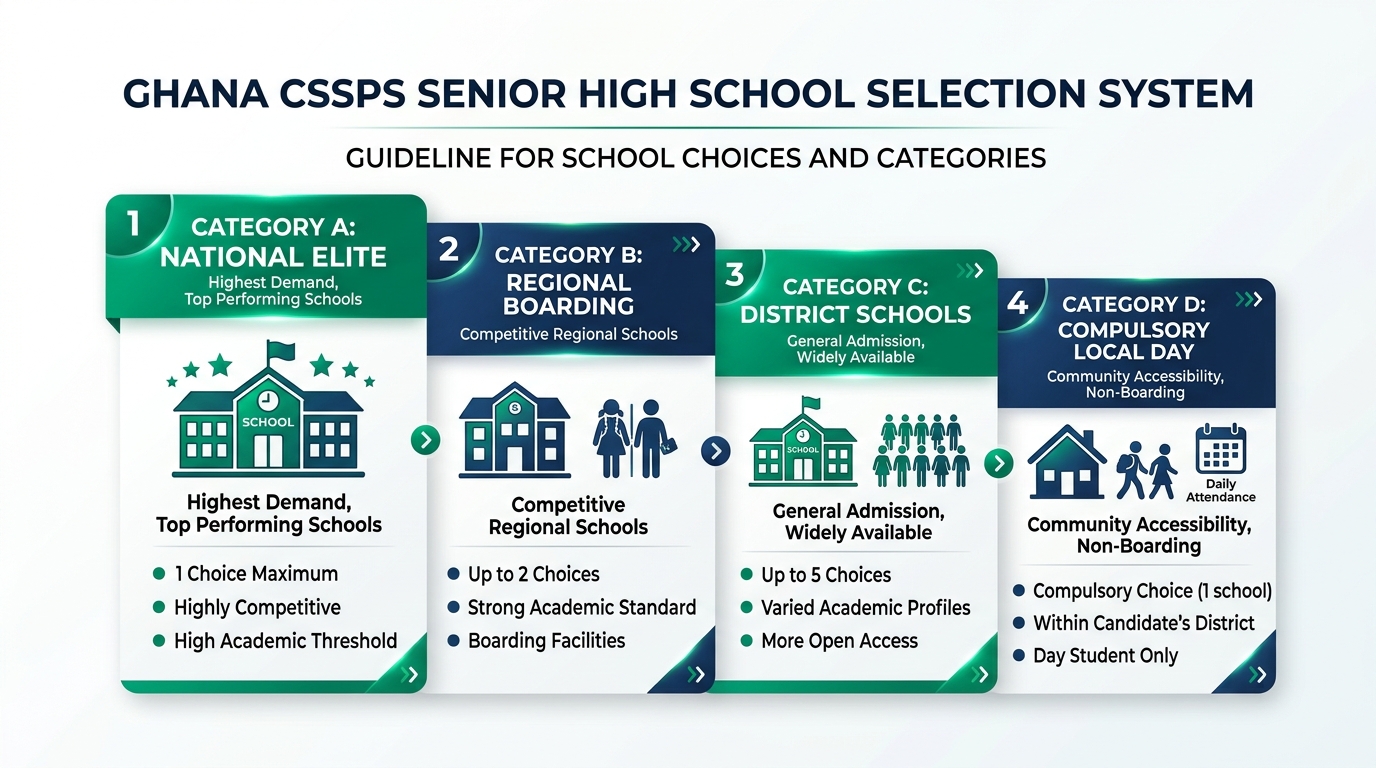
The Ghana Education Service organizes all public Senior High Schools and Technical Institutes into four distinct administrative categories based on infrastructure, academic history, boarding capacity, and national demand. When candidates register their six choices on the CSSPS portal, they must adhere to rigid category limits designed to prevent overcrowding in elite schools and ensure equitable distribution across districts.
The four operational categories
- Category A (Over-subscribed National Elite Schools): These are the most prestigious institutions with exceptional national academic records, advanced science laboratories, and extensive boarding houses. Due to overwhelming demand, candidates are permitted to select a maximum of ONE Category A school among their six choices. Attempting to select two Category A schools is automatically rejected by the registration portal.
- Category B (Regional High-Performance Schools): These are well-established institutions located across all 16 regions of Ghana with strong academic reputations and boarding facilities. Candidates may choose a maximum of TWO Category B schools.
- Category C (District and Emerging Schools): Comprising community day and boarding schools, rural secondary institutions, and emerging facilities, Category C forms the backbone of secondary access. Candidates may select up to FIVE Category C schools to ensure guaranteed admission pathways.
- Category D (Compulsory Local Day School): To guarantee that every student has access to secondary education within their immediate locality, every candidate MUST select at least ONE Category D school located in their home administrative district. This choice is strictly non-boarding (day status), eliminating accommodation constraints.
- Specialized TVET Category: Technical and Vocational Institutes are integrated into the selection system. Candidates can choose technical colleges across national, regional, and district tiers with modern workshops under the Free TVET initiative.
The 30% public basic school equity policy
A vital component of educational policy in Ghana is the 30% Equity Policy administered by the Ministry of Education. Historically, graduates from well-resourced urban private basic schools (preparatory and international schools) captured an overwhelming majority of boarding vacancies in Category A Senior High Schools, leaving talented students from rural and peri-urban public basic schools at a structural disadvantage.
Under the equity policy, 30% of all available admissions seats in every Category A Senior High School are ring-fenced and reserved exclusively for qualified candidates from public basic schools. This affirmative action mechanism ensures that students who attended local authority, municipal, and district assembly public Junior High Schools are evaluated within their own qualifying pool for these reserved spaces.
Practical implications of the equity quota
- Differential Effective Cut-Offs: A public school candidate with an Aggregate 10 or 11 may secure admission to a Category A institution under the 30% equity quota, whereas a private school candidate with Aggregate 09 might miss placement in that same school due to intense competition in the open quota.
- Verification of Basic School Attendance: WAEC and the Ministry of Education verify candidate enrollment records through the National Education Management Information System (EMIS). Candidates cannot misrepresent their school classification during registration.
- Affirmative Inclusivity: The policy has successfully expanded geographic and socio-economic diversity in Ghana’s flagship secondary institutions, granting life-changing academic opportunities to students from historically under-represented districts.
Automatic placement vs the CSSPS self-placement portal
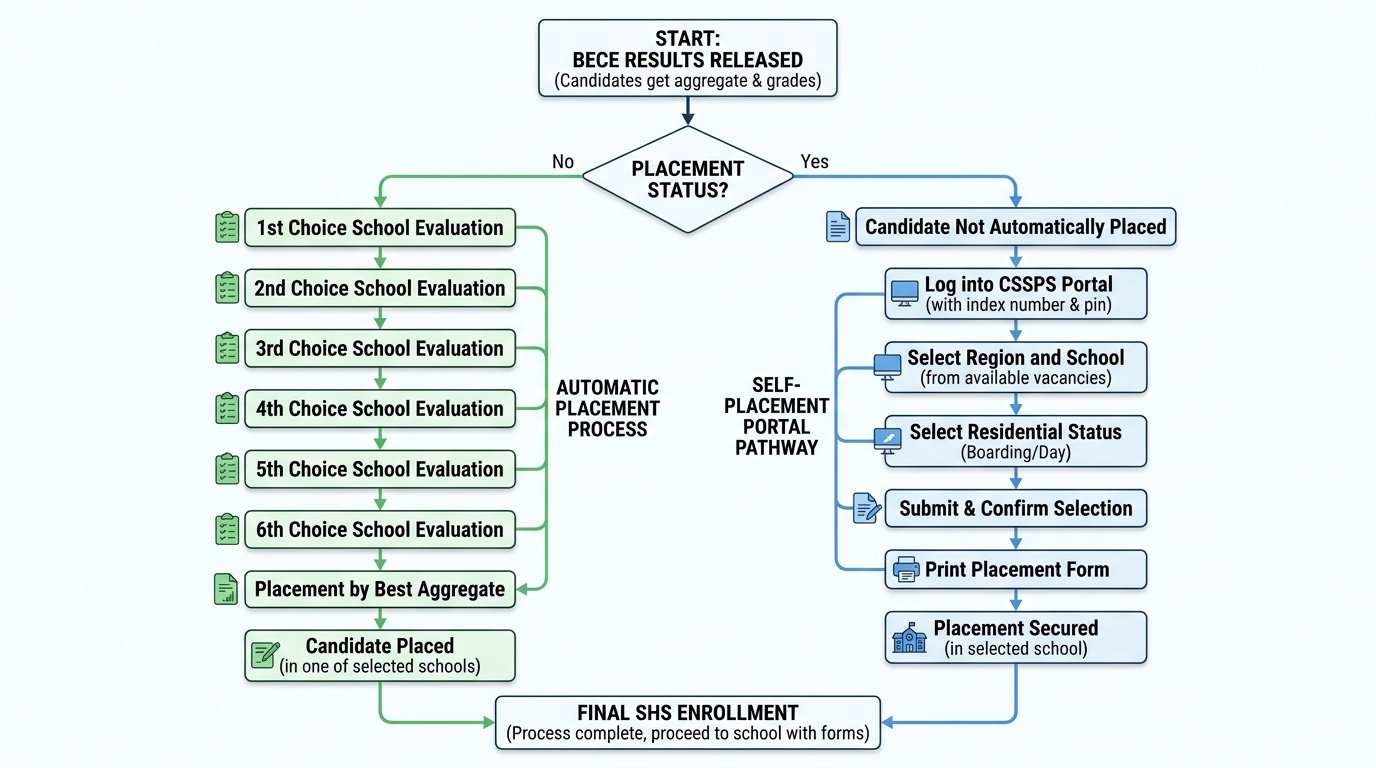
The placement process operates in two distinct sequential phases: the initial automated match and the interactive self-placement portal.
Phase 1: Automatic algorithmic placement
When WAEC finalizes and transmits raw scores and stanine grades to the GES, the CSSPS engine executes its matching algorithm:
- The system ranks all candidates nationwide in order of merit, sorting primarily by aggregate and secondarily by cumulative raw score.
- For each candidate, the algorithm inspects Choice 1. If the candidate meets the program cut-off and vacancies remain, admission is confirmed.
- If Choice 1 is filled, the system cascades down to Choice 2, Choice 3, Choice 4, Choice 5, and Choice 6 in strict priority order.
- If a candidate qualifies for none of their six selected choices—frequently because all selected schools were over-subscribed—the candidate is categorized as unplaced and referred to the Self-Placement Module.
Phase 2: The Self-Placement recovery module
Candidates who fail to secure automatic placement are not left without options. The Ministry of Education activates the online Self-Placement Portal on the official CSSPS website (cssps.gov.gh). The self-placement portal provides real-time access to remaining vacancies across all regions of Ghana.
Step-by-step self-placement walkthrough
- Access the Portal: Navigate to cssps.gov.gh using a desktop browser or mobile device. Enter your 10-digit BECE Index Number followed by the examination year (e.g., 101234567824).
- Authenticate with Voucher: Provide your purchased CSSPS Placement Checker PIN and serial number to authenticate your session.
- Select Geographic Region: Filter available schools by selecting a desired administrative region (such as Ashanti, Greater Accra, Central, Eastern, Northern, or Volta).
- Choose Available School and Programme: The portal dynamically displays only schools that currently have verified unfilled vacancies for your aggregate band. Select an institution and an approved programme (e.g., Business, General Arts, or Visual Arts).
- Specify Residential Status: Choose either Day or Boarding. Note that boarding vacancies in self-placement fill within hours of portal activation; candidates must act swiftly.
- Submit and Finalize Placement: Carefully verify all details before clicking the final submission button. Warning: Once a self-placement selection is confirmed and the placement form is printed, it cannot be modified or reversed online.
Strategic school selection: Building a balanced six-school list
The single greatest cause of candidate displacement during BECE placement is poor choice architecture rather than low academic ability. Thousands of students with commendable aggregates of 10 to 14 miss automatic placement every year simply because their selection forms contained four or five hyper-competitive schools with no realistic safety cushions.
The Golden Pyramid strategy for school selection
To construct a resilient, high-probability six-school list, educators recommend following the proven pyramidal structure:
| Choice Slot | Category | Strategic Function | Guidance |
|---|---|---|---|
| Choice 1 | Category A (National) | The Aspirant Reach | Target your dream institution. Choose a programme aligned with your absolute strongest subjects. Even if competition is intense, this provides your shot at an elite institution. |
| Choice 2 | Category B (Regional) | The Realistic Competitive Target | Select a premier regional school where your expected aggregate comfortably matches historical cut-offs. Ensure boarding facilities exist if you live outside the region. |
| Choice 3 | Category B (Regional) | The Solid Academic Target | A dependable, high-performing regional institution that provides strong academic instruction with slightly less intense admission pressure than Choice 2. |
| Choice 4 | Category C (District) | The High-Probability Safety | An established community or district boarding/day school where your aggregate easily clears previous years’ entrance cut-offs. |
| Choice 5 | Category C or TVET | The Practical Career Anchor | A strong Category C school or a modernized TVET technical college offering applied technical engineering, computing, or business programmes. |
| Choice 6 | Category D (Local Day) | The Compulsory Safety Cushion | Mandatory local day school within walking distance or a short, manageable daily commute from your family residence. Guarantees enrollment without residential bottlenecks. |
TVET and STEM pathways under the Free Senior High School framework
In recent years, the Ministry of Education has executed major reforms integrating Technical and Vocational Education and Training (TVET) and specialized Science, Technology, Engineering, and Mathematics (STEM) academies directly into the Free Senior High School policy framework. TVET institutions are no longer treated as secondary alternatives; they are fully funded, equipped with modern engineering workshops, and provide direct pathways to technical universities and tertiary engineering faculties.
Why candidates should consider TVET and STEM pathways
- Free TVET Policy: All tuition, practical workshop materials, textbooks, and boarding costs are completely absorbed by the government, identical to grammar-type Senior High Schools.
- Dual Qualification Advantage: TVET graduates write both the National TVET Qualification Framework (NTVQF) certificate examinations and the standard WASSCE / technical certificate, making them immediately employable in industry while remaining fully qualified for university admission.
- Specialized STEM Academies: Dedicated STEM Senior High Schools established across Ghana offer advanced coursework in robotics, artificial intelligence, biomedical science, aviation, and renewable energy, accepting high-performing BECE graduates with strong scores in Mathematics and Integrated Science.
Post-placement documentation and reporting day requirements
Securing a placement notification on the CSSPS portal is the first half of the transition process. To finalize enrollment and avoid forfeiting an allocated seat, candidates and their guardians must complete official documentation and report in person to their assigned Senior High School before the national deadline.
Mandatory document checklist for school reporting
- Official CSSPS Placement Form: Printed directly from the placement portal, indicating the assigned institution, selected programme, and assigned residential status (Boarding or Day).
- Completed Enrollment Form: Filled out with candidate bio-data, parental contact information, and residential address details.
- WAEC Official BECE Result Slip: The certified original or verified online printout displaying subject grades, aggregate, and candidate index number.
- National Health Insurance Scheme (NHIS) Card: A valid NHIS card for medical registration at the school infirmary.
- Medical Fitness Screening Report: Certified by a registered medical practitioner at an accredited district or regional government hospital.
- Passport-Sized Photographs: Six to eight recent identical photographs with the candidate’s full name and index number written on the reverse.
- Code of Conduct and Acceptance Undertaking: Signed by both the student and parent or legal guardian, pledging adherence to school regulations.
Critical Reporting Warning: If a candidate fails to report to their assigned school within the designated national reporting window without formal written notice to the school head, the CSSPS authorities reserve the right to declare the seat vacant and re-allocate it to an unplaced candidate during the mop-up phase.
Common mistakes with BECE aggregate and school choices
Decades of placement administration reveal consistent mistakes that disadvantage candidates. Avoiding these pitfalls can protect your academic trajectory:
- Including all electives in the aggregate: Adding three or four electives instead of only the best two inflates the numerical total, causing severe panic about placement prospects.
- Assuming an elective can replace a core: A candidate with Grade 1 in French or RME cannot use it to drop a Grade 6 in Core Mathematics. Core grades are fixed into the aggregate calculation.
- Selecting non-commutable Category D schools: Selecting a Category D day school located in a different town or district where the family has no residential accommodation leaves the student stranded when placed as a day student.
- Over-concentrating on hyper-competitive schools: Choosing six Category A and elite Category B schools leaves no safety cushion, almost guaranteeing that the candidate will miss automatic placement.
- Ignoring programme-specific cut-offs: General Science and General Arts at top schools frequently demand Grade 1 or 2 in Mathematics and Science specifically, regardless of whether the aggregate is within range.
- Delaying self-placement action: Vacancies in attractive institutions on the self-placement portal disappear within hours of activation. Hesitating for days leaves only distant day facilities with vacancies.
- Falling prey to placement scams: Fraudsters frequently solicit money claiming they can alter placement records. The CSSPS database is secured centrally by GES; paying unauthorized third parties results in financial loss and immediate disqualification.
Where this calculator stops
This calculator implements the official Ghana Education Service and WAEC Ghana aggregate algorithm: four compulsory core subjects plus the two best-performing electives. It delivers the exact, verified numerical figure that will appear on your official placement records.
However, this tool does not predict annual cut-off shifts for specific institutions, real-time boarding bed availability, or regional applicant quotas. Those operational factors vary from year to year based on national performance distributions. Use this calculator to ascertain your accurate baseline, evaluate alternative subject scenarios, and construct a strategic, balanced school choice portfolio before accessing the official CSSPS portal.
Sources and official portals
- West African Examinations Council — Ghana National Office. BECE Examination Regulations, Syllabuses, and Grading Rules. waecgh.org
- Ghana Education Service (GES). Guidelines for Senior High School Selection and Computerised Placement. ges.gov.gh
- Ministry of Education, Republic of Ghana. Free Senior High School and TVET Policy Implementation Directives. moe.gov.gh
- Computerised School Selection and Placement System (CSSPS). Official Placement Verification and Self-Placement Portal. cssps.gov.gh
- Commission for TVET (CTVET Ghana). National TVET Qualification Framework and Technical Institution Profiles. ctvet.gov.gh